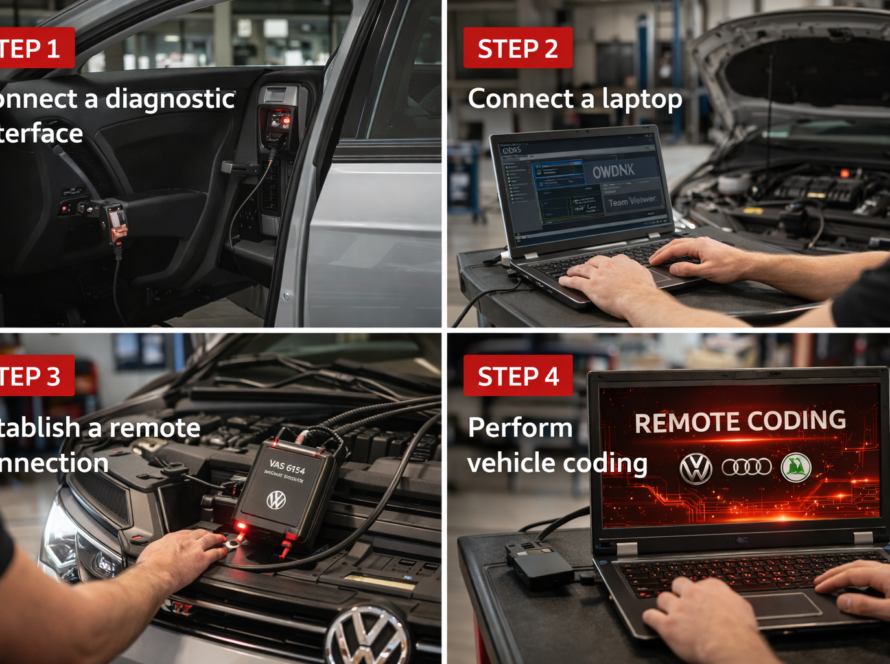
The Audi A4 B9 is a modern premium vehicle equipped with advanced electronic systems, including digital instrument clusters, infotainment units and multiple control modules connected through high-speed vehicle networks.
Like all modern Audi vehicles, the A4 B9 uses a security feature known as component protection. This system is designed to prevent unauthorized use of electronic modules and protect the vehicle from theft or illegal modifications.
For workshops and technicians, understanding how component protection works and how to remove it correctly is essential when replacing electronic components.
What Is Component Protection in Audi A4 B9
Component protection is a built-in security system used across the Volkswagen Group platform.
Each important control unit is linked to the vehicle’s VIN (Vehicle Identification Number). When a module from another vehicle is installed, the system detects a mismatch and automatically activates component protection.
This prevents the module from functioning normally until it is properly authorized.
Why Component Protection Is Activated
Component protection is triggered when:
- a used module from another vehicle is installed
- a control unit is replaced without proper adaptation
- the module VIN does not match the vehicle
- vehicle configuration data is inconsistent
This is common when installing second-hand parts such as infotainment systems, instrument clusters or gateway modules.
Symptoms of Active Component Protection
When component protection is active in an Audi A4 B9, the module enters a restricted mode.
Typical symptoms include:
- no sound from infotainment system
- limited multimedia or navigation functionality
- warning messages in the instrument cluster
- disabled vehicle features
In some cases, the system may appear functional but with significant limitations.
Modules Commonly Affected
Component protection in Audi A4 B9 most often affects:
- infotainment systems (MMI)
- digital instrument cluster (Virtual Cockpit)
- gateway module
- body control modules
These modules require proper authorization to function fully.
How to Remove Component Protection
The only correct way to remove component protection is by using ODIS Online connected to Audi servers.
The process includes:
- Connecting the vehicle to ODIS diagnostic software
- Logging into an authorized account
- Establishing connection with Audi backend servers
- Sending module identification data
- Verifying module compatibility
- Synchronizing the module with the vehicle
Once the process is completed, the system removes component protection and restores full functionality.
Why ODIS Online Is Required
Component protection is controlled by manufacturer servers, not by the vehicle alone.
ODIS Online is required because it:
- communicates with Audi servers
- verifies module authenticity
- updates vehicle configuration
- authorizes module adaptation
Offline diagnostic tools cannot perform this procedure.
Real-World Example
A used infotainment unit is installed into an Audi A4 B9.
- the system powers on
- but there is no sound
- navigation features are limited
After performing ODIS Online authentication:
- the module is verified
- component protection is removed
- full functionality is restored
Conclusion
Component protection removal in Audi A4 B9 is a critical process when replacing electronic modules.
Because the system is server-based, proper authentication using ODIS Online is required to restore full functionality. Attempting to bypass the system without authorization is not possible and may lead to further issues.
For workshops working with Audi vehicles, mastering component protection procedures is essential for efficient diagnostics and professional repair services.
Need help? We are here for you. whatsapp: +420773585568 mail: info@odisonline.eu
ODISONLINE.EU